Enterprise AI
TCU offers several educational enterprise AI accounts available for individual employees' TCU-related work purposes, with different levels of access and cost depending on your needs.
Enterprise accounts provide additional privacy, security, and administrative protections for TCU work that may not be available with personal or consumer AI accounts. TCU requirements for appropriate data use and information security still apply when using these tools.
AI tools and licensing change frequently. Available features, usage tiers, pricing, and access are subject to change. Please regularly refer to this page for updates.
Because TCU is offering AI tools that are similar in nature, it is helpful to know
what sets each one apart before deciding which tool to request. Explore all TCU's AI options.
Many everyday tasks (such as drafting emails, summarizing documents, quick research,
and basic writing help) can use the Microsoft Copilot Chat that is already included in your employee license at no additional cost. Microsoft
Copilot Chat is powered by OpenAI’s GPT models, so it shares many of the same underlying
AI capabilities as ChatGPT.
If you have been using Copilot Chat already and are regularly need capabilities beyond what it provides, consider which of the following tools best fits your work. These distinctions are general guidelines rather than hard boundaries: AI models and features evolve quickly, and both ChatGPT and Claude can perform many of the same tasks, including writing, research, data analysis, and coding.
ChatGPT may be a good choice when your work combines several types of tasks or media; for example, researching a topic across multiple sources, analyzing files or data, generating or editing images, using voice conversations, or producing structured outputs that need to follow particular instructions or formats. Usage Tip: The Standard Seat enterprise license includes 3 image generations and 5 deep research questions every 24-hours without consuming additional credits.
Claude may be a good choice when your work involves long documents, collections of documents, or a large amount of code that needs to remain available within the same working context. Some find the writing to have a more natural, nuanced tone. Usage Tip: Since Claude re-reads the full conversation with each new message, token usage (and how quickly you draw down your usage limit) increases the longer a single conversation runs. Starting a new conversation when a task is complete, as well as selecting the right level of model, can help manage usage.
TCU covers the cost of one Standard Seat license per employee (either ChatGPT or Claude, not both). If an employee wants a Standard Seat in both tools, TCU will pay for one, and the employee's department will need to cover the cost of the second seat.
A Standard Seat includes a base amount of use at no extra cost. If you find you’re reaching its limits, you can move up to a higher tier that uses credits or tokens.
Credits or tokens are not covered by TCU and must be funded by departmental budgets. A departmental budget code is required when requesting access, and departments are billed monthly for seat tier currently selected. See the FAQ section for additional details and processes.
Tier Options
Tiers and pricing may change as these tools and their vendors’ plans evolve.
Check here for updates, and confirm details when you request or change access.
| Tier Name | Standard | Plus | Premium | Advanced |
| What's Included per Month | Seat | Seat + up to $50 in usage credits | Seat + up to $150 in usage credits | Seat + up to $500 in usage credits |
| Seat License | University Provided | University Provided | University Provided | University Provided |
| Departmental Charge | $0 | $50 | $150 | $500 |
|
Common Functions & Examples |
Routine campus work, drafting emails and memos, brainstorming, meeting notes, basic lesson plans, simple research questions, light editing. | Data analysis on a spreadsheet, generating charts/slides, synthesizing a handful of sources for a lit review, moderate coding help, first-pass grant drafting. | Multi-step research projects, large document/data set analysis, sustained coding work, high-volume content generation, complex multi-source synthesis. | Multi-step automated workflows, custom assistants, connecting AI to other apps and files, large-scale coding and data projects. |
| Type of User | Fits most users. | Fits the top 10% of users by usage. | Fits the top 1% of users by usage. | Fits the top 0.04% of users by usage. |
| Chat GPT Type of Access OpenAI: ChatGPT Model & Rate Card |
Instant, default model. 3 Image generations & 5 Deep Research queries generations per rolling 24-hour period. |
Standard Access + use credits for additional use of image generation, deep research, or voice. |
Standard & Plus Access + use credits for heavy reasoning or pro-tier models, coding assistant (e.g., Codex). |
Standard & Plus & Premium Access + use heaviest credit usage & models. |
|
Claude |
Base EDU seat access to Haiku, Sonnet, and Opus models. 5-hour and weekly limits applied and refresh. |
Standard Access + use credits for higher usage before hitting rolling window reset for images and research. |
Standard & Plus Access + use credits for heavy reasoning or pro-tier models, coding assistant (e.g., Claude Code). |
Standard & Plus & Premium Access + use heaviest credit usage & models (e.g., Fable). |
If you need more than the included usage, request an AI Consultation to explore TCU's Research and Advanced Project AI tools.
FAQ
Credits and tokens are different ways AI applications may measure usage.
Credits are units used by some AI applications to measure the use of certain models or features. Different activities may consume different amounts of credits.
Tokens are small units of text and other information that an AI model processes when interpreting your request and generating a response. The number of tokens used can vary based on factors such as the length of your request, attached content, conversation history, and the response generated.
ChatGPT and Claude measure and charge for usage differently, so credits and tokens should not be compared directly between the two applications.
Many everyday work tasks are included as part of the Standard Seat (see common functions above) or can utilize lower-level models to reduce consumption. More advanced models and features, longer or more complex tasks, and larger amounts of content may consume additional credits or tokens.
Usage rates vary by application, model, and feature and may change as these services evolve. When possible, choose a model appropriate for the complexity of your task rather than automatically selecting the most advanced option.
Refer to the vendor information below for current rates and details about how usage is calculated for each application.
Understanding Model Usage and Cost
Different AI models and features consume credits or tokens at different rates. The resources below can help you understand the relative usage and cost of different models and features. Rates and models change frequently, so these vendor resources should be used as a general guide rather than as a fixed estimate of what a particular task will cost.
Individual users are responsible for managing their credit or token usage and can check it at any time from within the AI application.
How to check ChatGPT usage:
In the Settings area, choose Usage to see your monthly usage limit. 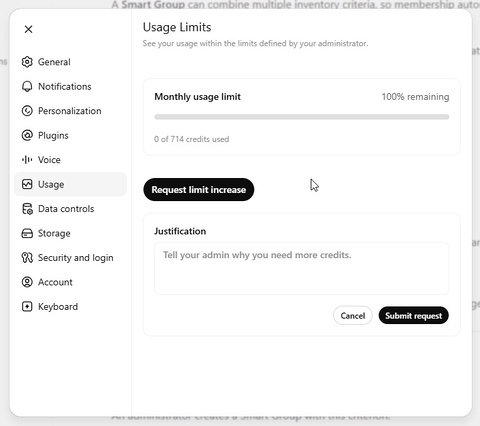
How to check Claude usage:
In the Settings area, choose Usage to see your weekly usage limit and your session reset limit.
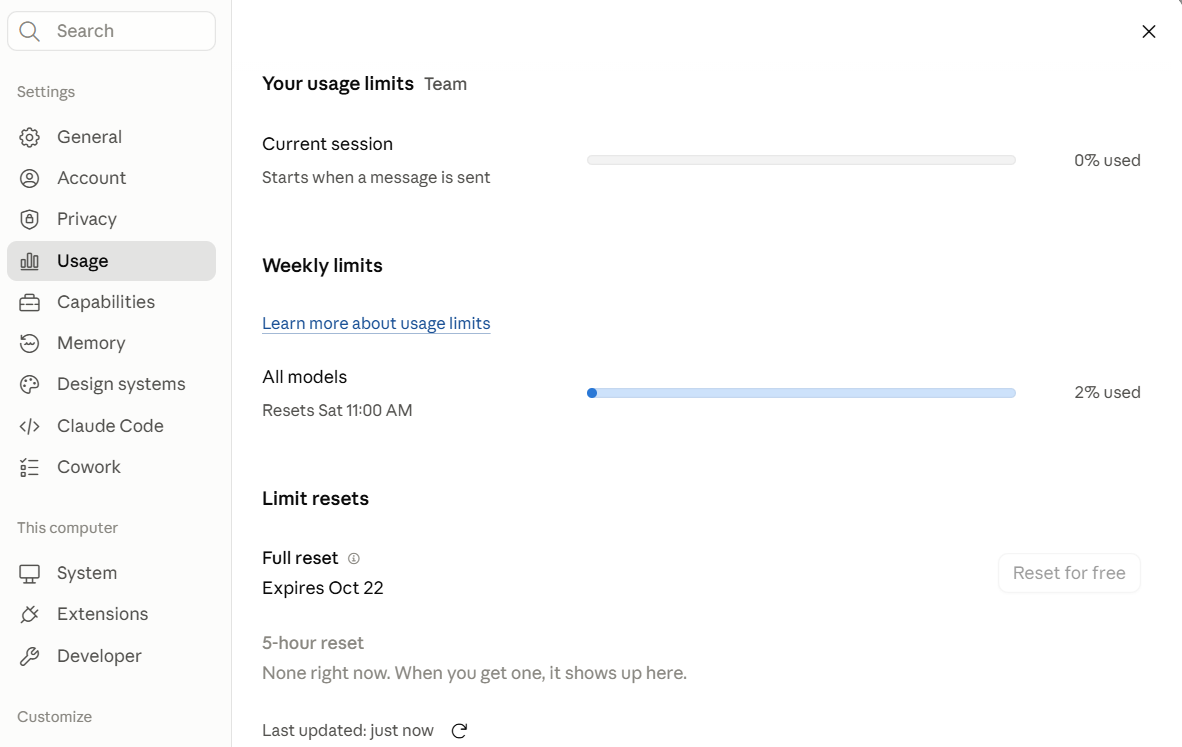
If you reach an applicable usage limit, access to the affected model or feature may be temporarily unavailable. ChatGPT or Claude will notify you when you reach a limit and, when applicable, indicate when that usage will become available again. You can also check the Usage area in your application's settings for information about your current limits and reset times.
ChatGPT Note: Reaching your monthly usage limit does not prevent you from using ChatGPT entirely. You can continue using the Instant model and other core features that do not consume credits. You will still have access to the ChatGPT Instant model with your standard 3 images, 5 Deep Research limits every 24 hours, but additional reasoning will be unavailable until the 24-hour mark has refreshed or the monthly credits are refilled.
Claude Note: Claude does not automatically switch to a lighter model when you hit your limit. Instead, access is paused until your session or weekly limit resets. Check your usage bar in Settings for reset timing.
You may request a change to your usage tier if you find that your current allocation is more or less than you need.
Subscriptions are renewed on the 20th of the month. To upgrade or downgrade your usage tier, submit an IT Help Desk ticket before the 20th and indicate the tier you are requesting.
If you cancel your license, you will lose access to your TCU-provided account and data. Before requesting cancellation, download or export any content you need to retain.
Enterprise AI accounts described on this page are intended for TCU employees. If students need access for a course, project, research activity, or other university work, submit an IT Help Desk ticket to discuss available account options and associated costs.
TCU IT provisions and manages access to enterprise AI accounts but does not provide formal training on how to use the individual AI applications.
Because AI tools and features change frequently, refer to each application's official help and learning resources for the most current guidance:
- ChatGPT: OpenAI Help Center
- Claude: Claude Help Center
- Microsoft Copilot: Microsoft Copilot Help & Learning